Export to Post Process Volume
On this page
GRADE can turn a look into a native Unreal Post Process Volume (PPV). Use it to ship a project without the GRADE runtime, to hand a look to a team that does not use GRADE, or to target a platform where you don't ship the plugin.
The export is an editor feature. It creates assets and actors, and it is undoable.
How to export
You can export from a GRADE Volume (its evaluated layers and tonemapper) or from any layer stack, such as a preset or the Image mode stack. In GRADE Studio, use the export menu and choose the Post Process Volume export.
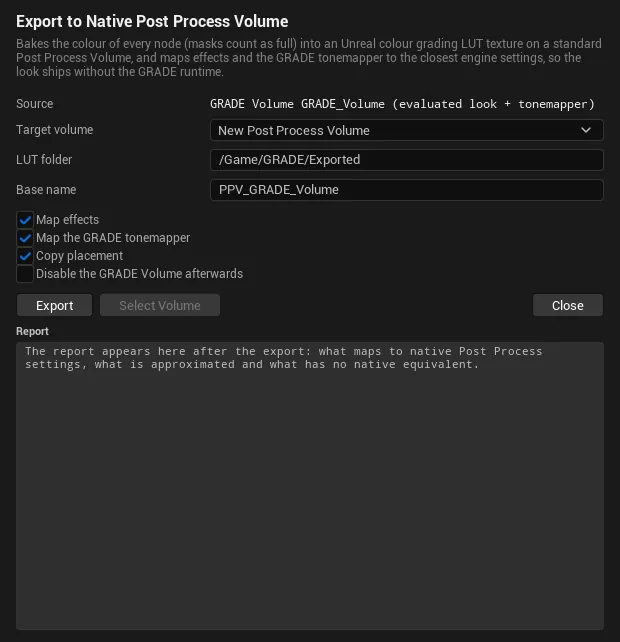
| Option | Default | Meaning |
|---|---|---|
| Asset Folder | /Game/GRADE/Exported | Content folder for the LUT texture. |
| Base Name | GRADE_Look | Name of the created texture and volume. |
| Map Effects | on | Maps GRADE effects to the closest Post Process settings. |
| Map Tonemapper | on | Maps the GRADE tonemapper to the engine's exposure and film curve settings. |
| Copy Placement | on | Copies the source volume's Unbound, box, Blend Radius, Priority and Blend Weight. |
| Target Volume | none | Updates this existing PPV instead of spawning a new one. |
After the export, GRADE shows a report: what was mapped exactly, what was approximated, and what could not be exported. Read it; it is the authoritative list for your look.
What is baked into the LUT
The colour of the whole stack is baked into one Unreal colour grading LUT texture (256x16, Texture Group ColorLookupTable) and assigned to the PPV's Color Grading LUT:
- Every layer's colour stage: Develop (including the Kelvin white balance), Primaries and Log wheels, HSL, Color Slice, Curves, Hue Curves, Levels, Color Balance, Selective Color, Color Replace, Color Warper, Channel Mixer, Black & White, Stylize, Gradient Map, Photo Filter, Color Science, Film and the layer's LUT.
- Color Management: the grading space and working gamut conversions are part of the layer's colour stage, so they are baked into the LUT too.
- Layer order, opacity and blend modes.
Masks are ignored (treated as full), because a LUT only holds colour: every mask type, the mask stack, density, feather, expand and clipping are lost. Export the unmasked layers only, or keep GRADE for looks that depend on masks.
What maps to Post Process settings
With Map Effects and Map Tonemapper on, GRADE fills the closest engine settings. These are approximations: the engine effects look similar, not identical.
| GRADE | Post Process Volume |
|---|---|
| Tonemapper exposure compensation | Exposure Compensation |
| Tonemapper curve | Film Slope, Toe, Shoulder, Black Clip, White Clip (closest for Unreal Filmic; others approximated) |
| Perceptual (OKLab) tonemapper | Fitted to the film curve like the other operators. If its curve cannot be fitted closely, the closest operator (Khronos PBR Neutral) is fitted instead; the report says which. Chroma Compression, Highlight Burn and Lightness Contrast are not exported |
| Bloom | Bloom Intensity, Threshold, Size Scale |
| Lens Bloom | Bloom Intensity (8 x the share of light that scatters x Global Intensity: the default 8 % gives 0.64, close to Unreal's 0.675), Threshold -1 (every pixel blooms, like Lens Bloom), Size Scale from Spread (0.75 gives 4). When the Bloom effect is also on, it wins the single engine bloom. Halo, spikes, streak, haze, tints and core size are not exported |
| Lens Bloom dirt mask | Bloom Dirt Mask and Intensity (when the Lens Dirt effect does not already use the slot) |
| Bokeh DOF (with a Focus Distance) | Depth of Field Enabled, Focal Distance, Aperture (F-stop, f/1 minimum), Sensor Width 36 mm. Unreal takes the focal length from the camera: the report gives the field of view that matches GRADE's focal length on a 36 mm sensor (or use a Cine Camera with that lens). Blades: Number of diaphragm blades (4..16), straight blades; Circle: round diaphragm; Anamorphic: Squeeze Factor 2. Autofocus, Heart / Star / Custom (texture) shapes, Max Blur, Highlight Boost, Cat Eye and Fringing are not exported |
| Vignette | Vignette Intensity, Color, Center (darkening only) |
| Grain Amount, Size | Film Grain Intensity, Film Grain Scale |
| Grain Shadows / Midtones / Highlights | Film Grain Intensity Shadows / Midtones / Highlights (Shadows and Highlights are relative to Midtones in GRADE, absolute in Unreal; converted) |
| Grain Shadows Range / Highlights Range | Film Grain Shadows Max / Highlights Min (approximate: GRADE measures display tone, Unreal linear luminance; the default 50 gives Unreal's defaults 0.09 / 0.5) |
| Grain Texture | Film Grain Texture (approximate; replaces the procedural grain) |
| Chromatic Aberration | Chromatic Aberration Intensity and Start Offset. Per Channel converts its R/B scale shifts into an equivalent corner fringe; Blend scales it |
| Sharpen | Sharpen (radius, masking, style and effect mask not available) |
| Lens Dirt (with a texture) | Bloom Dirt Mask, Intensity, Tint (approximate: Unreal shows it where its bloom is; threshold, scattering and smudge are lost). Procedural dirt is not exported |
| Overlay with Lens Dirt on (texture source) | Bloom Dirt Mask, when the Lens Dirt effect does not already use it |
| Ambient Occlusion | SSAO Intensity, Radius, Fade Distance (SSAO is not used while Lumen GI is active) |
| Shutter | Motion Blur Amount = shutter angle / 360 (180 deg gives 0.5). Rolling shutter, light trails and camera-only blur are not exported |
| Lens Flare | Lens Flares Intensity (GRADE 25 = 1), Threshold (the EV above mid grey converted to luminance), Tint. Ghost layout, halo ring, starburst, chromatic fringes and the sun flare are not exported |
| Lens Character (with Bokeh DOF exported and Bokeh DOF follows the lens on) | Anamorphic: Depth of Field Squeeze Factor (1..2). Spherical: Squeeze Factor 1 and the aperture blades as Diaphragm Blade Count (4..16). Streaks, starburst, ghosts, halo, edge stretch / blur, barrel / pincushion, lens vignetting and breathing are not exported |
| Lens Optics | Optical vignetting -> Vignette Intensity, Lateral Color -> Chromatic Aberration Intensity, each only when GRADE's own Vignette / Chromatic Aberration effect is off. Coma, astigmatism, corner softness and field curvature are not exported |
| Log wheels, Color Science | Part of the colour stage: baked into the LUT |
Some effects have a native alternative that the export cannot set up for you; the report points to it:
| GRADE | Native alternative |
|---|---|
| Atmosphere | An Exponential Height Fog: Fog Density, Height Falloff and Start Distance, Inscattering Color, Directional Inscattering for the sun glow |
| Sun Shafts | Light Shaft Bloom / Light Shaft Occlusion on the directional light |
| Halation | No equivalent (Unreal's bloom has no colour-filtered spread); a warm Bloom tint is the closest |
| Bokeh DOF autofocus | A Cine Camera Actor with focus tracking (Focus Method Tracking), or set a Focus Distance before exporting |
| Bokeh max blur | r.DOF.Kernel.MaxBackgroundRadius / MaxForegroundRadius console variables |
| Bokeh cat-eye | The depth of field Barrel Radius / Length settings give a similar optical vignetting |
| Perceptual exposure | The PPV's Exposure Compensation Curve and Min / Max EV100 |
| Volumetric Haze | An Exponential Height Fog with Volumetric Fog on (density / height falloff, second fog data for the upper layer, the light's Volumetric Scattering Intensity) |
| Relight | Real lights placed like the virtual lights (a rim light behind the subject) |
| Rack focus (Focus Actor) | A Cine Camera Actor with Focus Method Tracking |
| Transition | Sequencer's Fade track for fades and dips |
| Bodycam HUD, HUD Targets | UMG widgets; pixelation needs a post process material reading Custom Depth |
Effects with no native equivalent are not exported and are listed in the report: halation, clarity, texture and dehaze, soften and diffusion, pixelate, lens distortion, overlay textures and gradients, gradient, compression, scanlines, film damage, VHS, interlacing, retro 8-bit, light streaks, light leaks, tilt-shift, cavity, outline, heat haze, painterly, effect masks, extra grain layers and the grain noise function, blend mode and frame rate; underwater, night vision, thermal, toon, halftone, sketch, neon edges, CRT, glitch, zoom blur, damage vignette, double vision, lens rain, frost, fisheye and film burn, as well as Scotopic vision; gradient fade bars (use a UI overlay, or a camera's Constrain Aspect Ratio for hard bars), broken glass, pixel sort, datamosh, signal loss and a custom bokeh shape texture (exported round). Custom textures of effects that are not exported are not exported either. Snell's window, the lens rain drop shapes and camera reaction, the glow vignette edge blur and motion lag, the radar display and per-mode vision settings, the portal view (natively a Scene Capture 2D on a plane), the stylize borders and stencil-value targets are reported; the new weather / vision / vignette / stylize textures are flagged when they live in plugin content. The underwater Gerstner waves, Auto Depth (a native setup is fixed for one depth: tune the fog and the light for the depth you want), animated or custom-oriented light shafts, particle bokeh and bubble streams; the glitch layers; the lens rain impacts, bead trails, highlights and defocus; and a custom effect order (Unreal's post process order is fixed, so the exported settings apply in the engine's order). The report names the ones the look uses. Diffusion filters, frequency detail, glow vignette, bodycam, HUD targets, transitions, relight, volumetric haze, the split diopter / tilted focal plane (only the first focus distance is exported), film gauges and chroma grain, and the reel damage (cue marks, splices, frame line, physical dust, gate corners) are not exported either. Every game effect (player status, vision modes, weather, speed, hallucination, supernatural, diegetic interfaces, combat, retro consoles, stylize pro, gameplay dynamics) and the photo mode frame / logo / stickers. The report names the closest native setup for each (post process materials, Custom Depth, UMG widgets, height fog, motion blur). The VHS sway, bars and camcorder OSD, camcorder night vision, soft S-curve toon / tint / line art, the pencil and ink sketch styles, the retro dither patterns, Paint Smear, the Pulse Scan vision mode and the underwater 3D particles / waterline, the underwater shoreline switch and transition animation, the target labels (typewriter, fade, uniform pixelation) are reported; HUD fonts are flagged when they live in plugin content. Color Slice is part of the colour stage, so it is baked into the exported LUT like the other colour sections.
If the look uses the GRADE tonemapper and has no Bloom or Lens Bloom, the export sets the PPV's Bloom Intensity to 0 (the GRADE tonemapper skipped the engine bloom). An exported Lens Dirt mask then needs some bloom to show; the report says so.
Limitations
- Precision. The 256x16 strip is a 16^3 LUT. GRADE grades with 33^3 LUTs, so steep curves, posterize, threshold and strong warper moves can band slightly.
- Where the LUT applies. Unreal applies the LUT inside its tonemapper, on the tonemapped image. That matches GRADE when GRADE does not override the tonemapper. If your look uses the GRADE tonemapper, the export maps it to the engine's film curve, which only approximates operators such as AgX or Khronos PBR Neutral.
- HDR. The colour grading LUT is designed for SDR. Check exported looks on an HDR display before shipping HDR.
- Snapshot. The export captures the look as it is now. Preset Blend, trims, Sequencer tracks on GRADE Volumes, Blend To Preset and gameplay pulses are not converted.
- One volume per export. Several GRADE Volumes stacked by priority each need their own export.
- Viewer aids. Frame overlays are not part of any image. A volume's letterbox is not exported; use a camera's aspect ratio constraint instead.
Check the result
- Export, then compare with GRADE bypassed:
grade.Enabled 0. - Disable or delete the GRADE Volume, so the look does not apply twice.
- Read the report and recreate missing effects by hand if you need them (for example a material post process for scanlines).
See also LUTs for exporting the colour only, as .cube or as an Unreal LUT strip.