DocsGRADEMonitoring & performance
Performance
GRADE is built to run in shipping games. Colour grading is almost free; effects cost GPU time in proportion to what they do. This page explains what costs what and how to measure and scale it.
What costs what
- Colour layers are almost free. Each layer's colour stage is a cached 3D LUT (rebaked on the CPU only when the layer changes), and up to 16 layers run in one GPU pass. White balance, Color Management, Color Slice, curves and every other colour tool add nothing at runtime. HDR Zones are the exception in live views: one scene-linear pass (
stat gpu: GRADE HDR Zones) for all layers that use them, only while a zone is used. - The GRADE tonemapper replaces the engine tonemapper and costs about the same. Its Compare operators gallery takes a small capture every 0.5 s only while it is open.
- Effects are spatial passes. Their cost depends on the effect, its radius or sample count, and
grade.Quality. Disabled effects cost nothing.
Rough guide (full screen, 1080p, High quality):
| Cost | Effects |
|---|---|
| Cheap (one simple pass) | Vignette, Gradient, Overlay, Scanlines, Pixelate, Lens Distortion, Fisheye, Cavity, Screen Space Bevel, Camera Shake, Outline, Interlacing, Heat Haze, Toon, Halftone, Sketch, CRT, Glitch, Damage Vignette, Frost, Broken Glass, Film Damage, Grain, Retro 8-bit, Retro Console (vertex snapping included), Bloom (Classic, every style), Transition, Overlays, Camera Frame |
| Moderate | Lens Character (Spherical), Chromatic Aberration (Radial Blur / per channel), Sharpen (Distance Weighted), Clarity, Soften, Tilt-Shift, Lens Bloom (about the engine bloom), Halation, Light Streaks, Compression (JPEG / Video), VHS, HUD Targets, Bodycam, Vision Modes, Weather, Kuwahara, Ghost World, Time Fracture (plus its frame history memory) |
| Expensive | Bokeh DOF with a large Max Blur, Lens Rain, Ambient Occlusion at high Quality, Sun Shafts with long rays, Lens Dirt with high Scattering, Painterly with a large radius, Neon Edges with a wide Glow, Underwater light shafts at Epic, Volumetric Haze, Relight with several lights, Shutter at high quality, Stylize Pro Oil Paint, Painted World, Anime Painted |
Estimated costs at 1080p, High quality (check them on your hardware: stat gpu lists GRADE's GPU stats, ProfileGPU or Unreal Insights show every GRADE pass by its event name):
| Effect | About | Where to look |
|---|---|---|
| Ambient Occlusion (half resolution, Quality High) | 0.6 ms; at full resolution the occlusion pass costs 3-4x | stat gpu: GRADE Scene.AO |
| Screen Space Bevel | 0.3 ms (8 directions x 4 / 6 / 8 / 12 search steps for quality 0-3) | GRADE.Scene.Bevel, GRADE.Bevel.GBufferNormals |
| Cavity | 0.15 ms (reading the normals about 0.05 ms per pass) | GRADE.Scene.Cavity, GRADE.Scene.DetailNormals |
| Lens Character, Spherical with 7 blades | 0.25 ms | GRADE.OpticsPro.Spherical... |
| Camera Shake | one full-resolution pass, 1 to 12 taps depending on the shake motion and quality | GRADE.CameraShake |
| HDR Zones (live views) | one scene-linear pass for all layers | stat gpu: GRADE HDR Zones |
| Painted World | 1.8 ms (Low 0.9, Medium 1.3, Epic 3.6 at full-resolution paint) | GRADE.PaintedWorld.* |
| Anime Painted | 1.5 ms (Low 0.8, Medium 1.1, Epic 2.2), + 0.15 ms with depth | GRADE.AnimePaint.* |
| Ghost World | 0.6 ms (Low 0.35, Epic 0.8), + 0.1 ms with spirits; Afterimages: 16 MB per live view | GRADE.GhostWorld |
| Time Fracture | 0.5 ms (0.3 at Low / Medium) + 0.05 ms per captured frame; history 50 MB per live view (6 frames at 1080p) | GRADE.TimeFracture |
| Bloom (Classic) style | Soft / Anime Glow 0.15 ms, CRT Glow 0.25 ms, Ocular 0.45 ms | Bloom pass of the PostUber group |
| Retro Console, vertex snapping | under 0.04 ms (world grid mode), under 0.05 ms (screen grid mode), at the console resolution | GRADE.RetroConsole.LowRes |
| Camera Frame | 0.1 ms (0.15 ms with focus peaking), one pass, no extra memory | GRADE.CameraFrame |
| Kuwahara by style | Anisotropic 0.3 ms (low) to 1.2 ms (epic); Classic 0.1 to 0.2 ms; Circular 0.2 to 0.8 ms; Combo the Anisotropic cost + 0.15 ms | GRADE.FX.Kuwahara*, GRADE.FX.KuwaharaBoxX / BoxY / Classic |
| Denoise (1440p) | Basic 0.12 ms (Low) / 0.3 ms; Advanced 0.6 / 0.85 / 1.1 / 1.4 ms (Low to Epic), + 0.15 ms Temporal, + 0.2 ms scene guides | GRADE.Denoise.* |
| Effect opacity below 100 % | one full-resolution mix pass per effect (none at 100 %; 0 % skips the effect) | GRADE.Opacity |
| Effects limited by a node mask | each node mask evaluated once per chain (like an advanced mask, 0.03 to 0.15 ms) + one full-resolution mix pass per masked effect; nothing when no masked node has effects | GRADE Effect Masks |
The figures of Painted World, Anime Painted, Ghost World, Time Fracture, the Bloom styles, Camera Frame, Screen Space Bevel, the Kuwahara styles, Denoise and vertex snapping are estimates from their sample counts, not measurements on your GPU.
Some effects share one shader pass in the default order (bloom, light streaks, light leaks, overlay, gradient and vignette; lens rain, frost, broken glass and damage vignette; the stylize group; the glitch family). Moving an unrelated effect between them splits the pass and costs one extra full-screen pass (see Effect order). An effect opacity below 100 % on one of them splits the pass the same way, so that effect runs alone, plus one mix pass. Effects limited by a node mask (Masks limit effects too) keep sharing their pass with the effects of the same node and are split from the effects of other nodes.
GRADE Volumetrics fog is drawn by the engine's volumetric fog, not by GRADE's effect passes: its cost is the volumetric fog grid (global, set by the Volumetrics quality) plus each fog material over the voxels it covers. See GRADE Volumetrics.
Ground Blend (experimental) costs one full-screen GBuffer pass per view (estimated 0.3 - 0.5 ms at 1080p, stat gpu: GRADE Ground Blend (before lighting)) and a capture of the ground only when the camera moves a step or a setting changes (GRADE Ground Blend (cache)), plus 20 / 80 / 310 MB of video memory at Low / Medium / High. Nothing runs without an enabled Ground Blend actor in the level. See Ground Blend.
Measuring
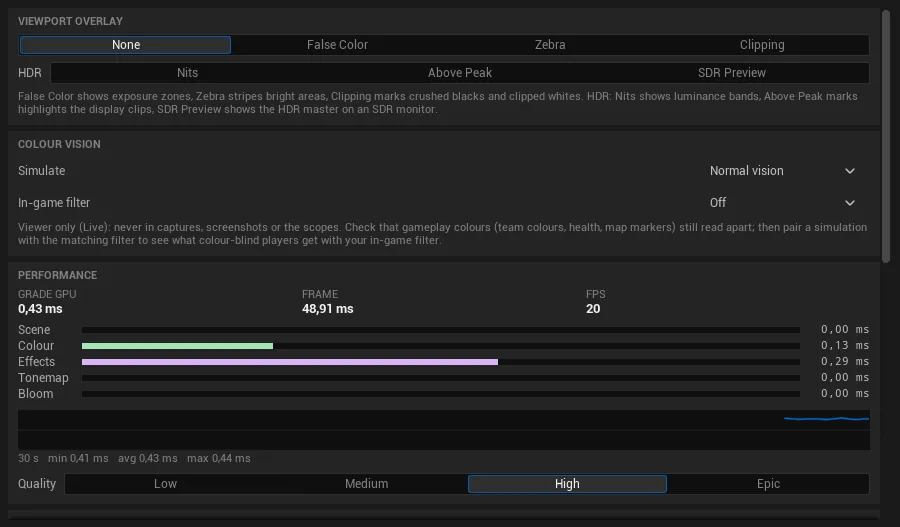
- Monitor panel: GPU time per GRADE stage with a sparkline, frame time and FPS, render size and screen percentage. The level viewport must be Realtime for the render values to update (the Monitor tells you when it is paused).
- Status bar of GRADE Studio: GRADE's total GPU time.
stat gpuin the console: GRADE's passes are listed by name.- Blueprint: Get Gpu Time Ms on the GRADE subsystem (negative when timing is unavailable).
- Compare with
grade.Enabled 0(GRADE off everywhere) or Before / After (only the edited world).

Scaling quality
grade.Quality(0 low, 1 medium, 2 high = default, 3 epic) scales bloom mips, blur resolution of clarity / soften / tilt-shift, chromatic aberration taps, light streak resolution and passes, grain octaves, the retro dither matrix, the painterly filter (isotropic at low) and lens resampling (bilinear at low); Ambient Occlusion shifts its own quality preset by it (use its Resolution Half and Temporal denoise for the best quality per millisecond), and Underwater shafts follow it with Shaft Quality = Auto. Map it to your game's scalability settings (see Console Variables).- Per-effect quality: Lens Bloom Quality = Cheap on integrated GPUs, Ambient Occlusion Quality, Underwater Shaft Quality, Weather / Relight / Volumetric Haze / Shutter Quality.
- Reduce radii: Bokeh DOF Max Blur, Soften and Clarity, Painterly and Kuwahara Radius, Sun Shafts Length, Neon Edges Glow, Lens Dirt Scattering.
- Use
grade.Quality 3for final captures and Movie Render Queue. - Offline renders: on the Render page, add
grade.Quality 3in Console Variables. GRADE runs once per rendered sample, so its cost per output frame follows the samples per frame of the quality preset (Final 8x, Ultra and Path Tracer 64x the cost of one frame); the render time is dominated by the scene, not by GRADE.
Good habits
- Disable the engine's own bloom, vignette, grain, depth of field and motion blur in your Post Process Volumes when you use GRADE's versions, so they do not run twice (the GRADE tonemapper skips the engine's bloom, vignette and grain automatically, see Tonemapper).
- Keep gameplay effects (blood, damage, weather) off until gameplay turns them on: the Blueprint helpers switch them on for you.
- A bound volume the camera is not in (weight 0) adds no GPU work.
- To ship a look without the GRADE runtime, see Export to Post Process Volume.